How do I resolve sudden clinician callouts with the 1-Click Rapid Replacement Engine?
Learn how to handle last-minute nurse sick calls and emergency absences with AI-powered candidate scoring, credential verification, and 1-click schedule reassignment.
What You Need Before Starting
- Assigned shift on the master Scheduling Calendar.
- Active healthcare staff roster with uploaded credentials.
Step-by-Step Instructions
Report an Emergency Callout
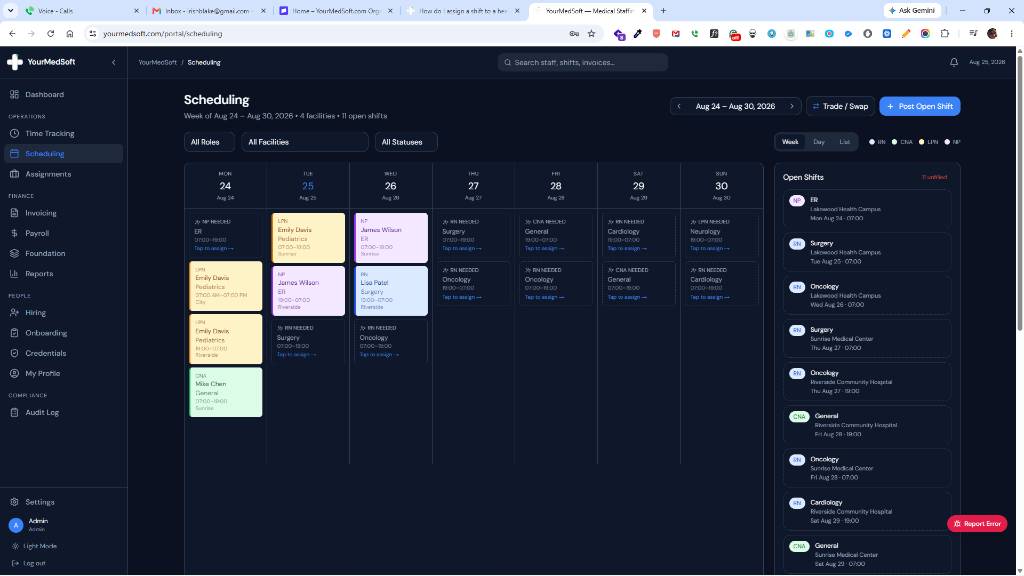
On the Scheduling Calendar, locate the affected shift block and click the red "Callout" button next to the assigned staff member’s name.
Review the Urgent Callout Notice
The Emergency Replacement Modal appears with a high-priority banner detailing the facility, shift date/time, unit specialty, and the calling-out staff member.
Inspect Scored AI Replacement Candidates
The matching algorithm instantly evaluates your entire clinician roster and displays the Top 5 best available replacements, ranked by a 0–100% Match Confidence Score.
Review Matching Rationale & Qualifications
Check candidate verification chips: Exact License Match, Cross-Coverage Eligibility (e.g. NP/RN covering an urgent floor), 100% Active Non-Expired Credentials, and Zero Schedule Conflicts.
Execute 1-Click Reassignment
Click "Assign & Fill Shift" on your preferred replacement candidate. The shift status updates immediately, master calendars synchronize, and audit logs are recorded.
Pro-Tips & Best Practices
- The engine automatically filters out any clinician already scheduled on another unit or facility on that date to prevent double-booking.
- If no immediate conflict-free staff are available, post an urgent broadcast alert from the modal to notify unassigned PRN float pool nurses.
Frequently Asked Questions & Troubleshooting
Does the replacement clinician receive an immediate shift notification?
Yes. Reassigning the shift automatically updates the clinician’s mobile PWA schedule and sends an instant dispatch notification.
Can cross-coverage candidates be assigned if an exact role match is unavailable?
Yes. Qualified cross-coverage rules allow higher-credentialed staff (such as RNs or NPs) to cover critical LPN/CNA shifts during severe emergency shortages.
Was this guide helpful?
Your feedback helps us continuously improve our documentation.